
AI Furniture Photography: From White Background to Magazine-Quality Room Shots (Without Moving a Single Couch)
Stop renting studios and wrestling with heavy sofas. Learn how AI transforms one simple furniture photo into unlimited lifestyle room shots in seconds - at a fraction of traditional photography costs.
🤖Explore this article with AI
Get AI-powered summaries, insights, and analysis from top AI platforms. Each platform offers unique perspectives on the content.
Ever tried photographing a dining table and realized you need to rent a warehouse-sized studio just to get a decent angle?
Or spent an entire afternoon rearranging a 100kg sofa because the lighting wasn't hitting right?
Here's what nobody tells you about furniture photography: it's an absolute nightmare.
You need massive studio spaces (because try fitting a king-size bed in a normal room). You need expensive wide-angle lenses that don't distort everything. You need a small army to move heavy pieces for every single shot. And then you need to do it all again for the "cozy bedroom" version, the "modern apartment" version, and the "Scandinavian minimalist" version.
AI changes everything.
One photo. One simple white background shot. That's all you need.
From there? AI places your furniture in any room you can imagine - modern living rooms, cozy bedrooms, sun-drenched offices. No studio rental. No furniture wrestling. No sweat.
This guide shows you exactly how to do it, with real examples and copy-paste prompts.
Explore our Furniture Image tool →
Why Furniture Photography is a Logistical Nightmare (And Why AI Solves It)
Let's be honest. Furniture photography isn't just "product photography at a larger scale." It's a completely different beast.
The Traditional Furniture Photo Shoot Reality:
The Space Problem:
- Need a 200+ m² studio just to photograph a sectional sofa properly
- Studio rentals: $500-$2,000 per day
- Most photographers don't even have access to spaces this large
The Heavy Lifting Problem:
- That 140 kg solid wood dining table? Someone has to move it. Multiple times.
- Each angle change = another round of furniture wrestling
- Want to show the same sofa in 5 different room styles? That's 5 complete set changes.
- Hope you have a strong back and patient movers.
The Staging Problem:
- Physical room staging requires buying or renting props, rugs, plants, decor
- Prop costs: $500-$2,000 per setup
- Storage for all those props? Another expense.
The Consistency Problem:
- Maintaining the same lighting and style across 50+ furniture pieces = weeks of shooting
- One cloudy day and your lighting doesn't match yesterday's shots
The Math: Traditional furniture photoshoot for 20 pieces:
- Studio rental: $1,500
- Equipment: $500
- Movers/assistants: $800
- Props and staging: $1,000
- Photography time: 3-4 days
- Post-production: 2 weeks
- Total: $4,000-$6,000 and a month of work
The AI Advantage:
AI workflow for 20 pieces:
- One day of simple white-background shots (your garage works fine)
- Upload to BackdropBoost
- Apply your room style templates
- Generate unlimited room variations
- Total: $20-$40 and same-day results
Modern AI understands furniture scale, lighting, and room context automatically:
- Intelligent perspective correction that maintains realistic proportions
- Background generation that creates believable room environments
- Lighting simulation that enhances wood grain and fabric textures
- Instant creation of lifestyle contexts - no physical staging required
- Virtual room changes without touching a single piece of furniture
From White Background to Lifestyle Showcase: Real Transformations
Here's the magic: one photo is all you need.
Take a simple shot of your furniture on a white background. Your warehouse, your garage, even a white bedsheet works. That's your starting point.
From there, AI does what would normally require:
- A professional interior designer
- A fully decorated room set
- A team of movers
- Thousands of dollars
Let me show you what I mean:
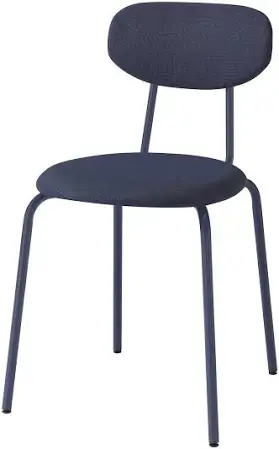
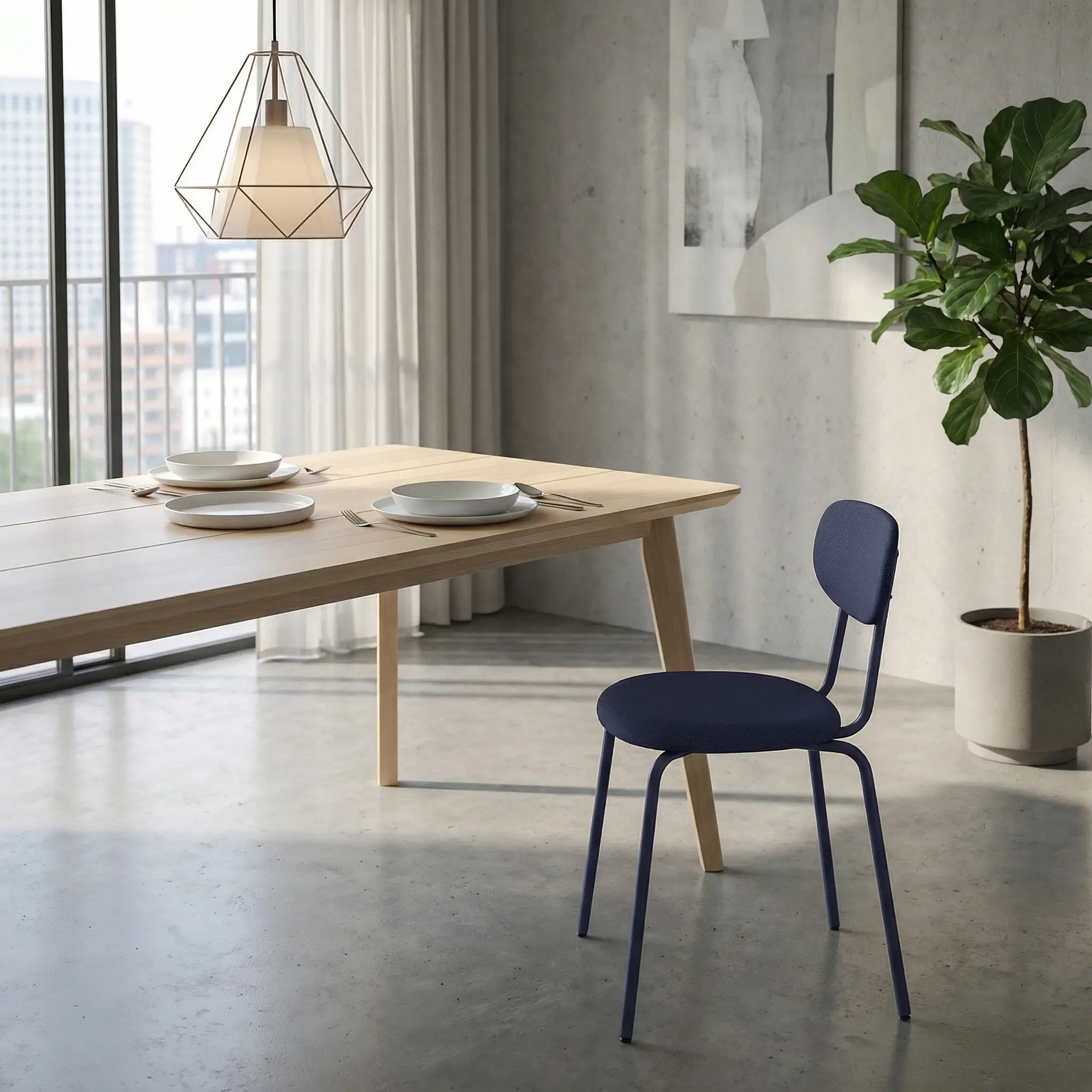
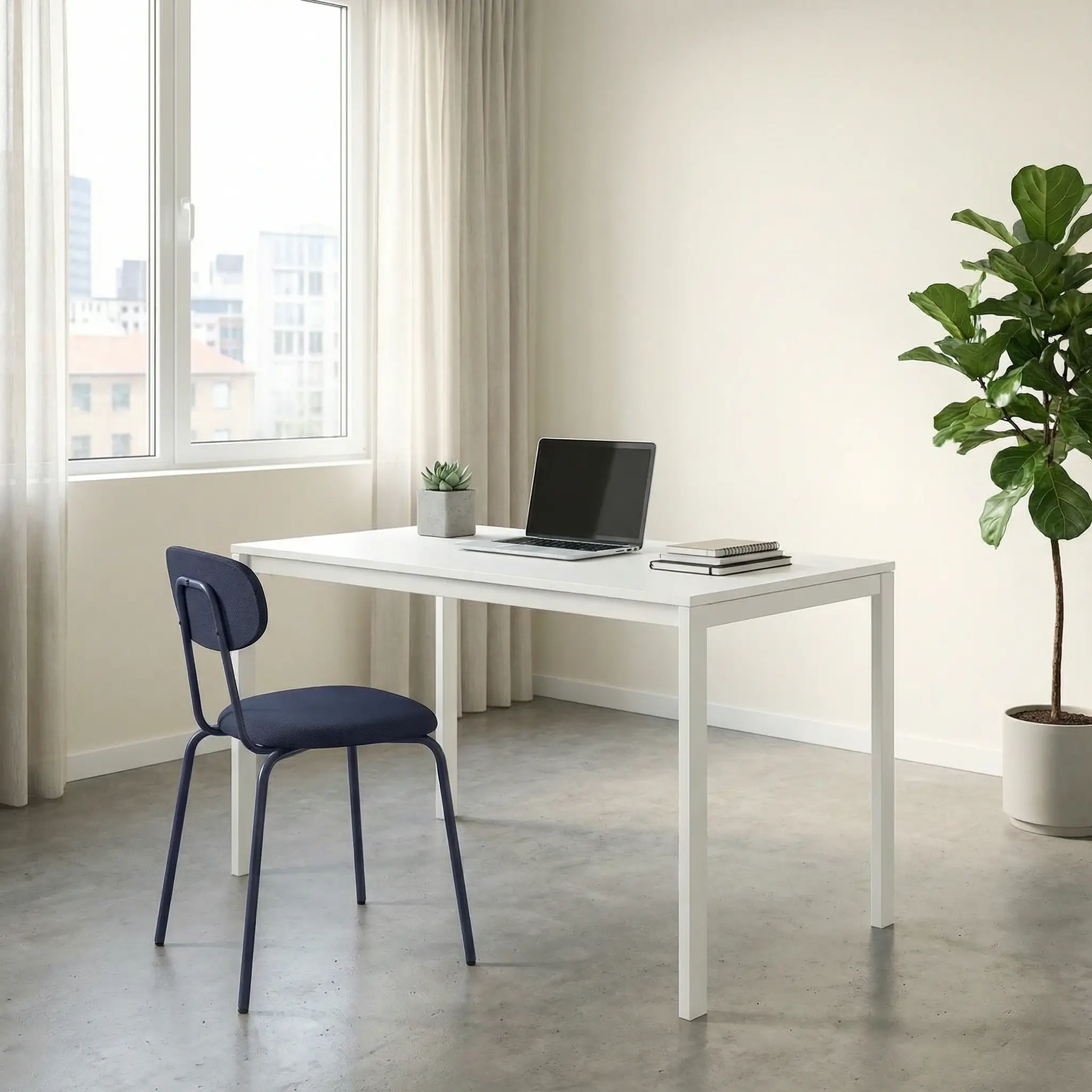
Example 1: Dining Chair
Traditional approach: Rent a styled dining room set. Move the chair into position. Adjust lighting. Shoot. Then completely change the room setup for variant 2. Time: 4-6 hours. Cost: $500+
AI approach: Upload one white background photo. Generate both variants. Time: 30 seconds. Cost: $0.24
Before: Plain white background studio shot
After - Option 1: Chair in modern dining room
After - Option 2: Chair in minimalist office setting
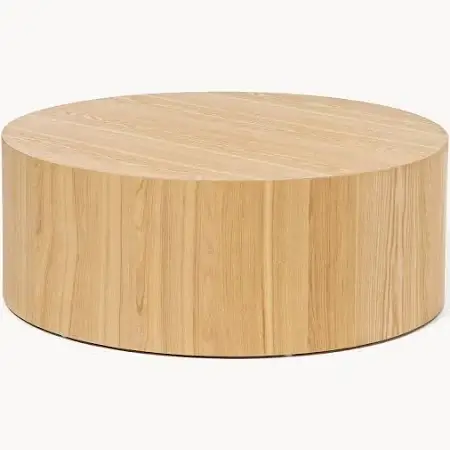
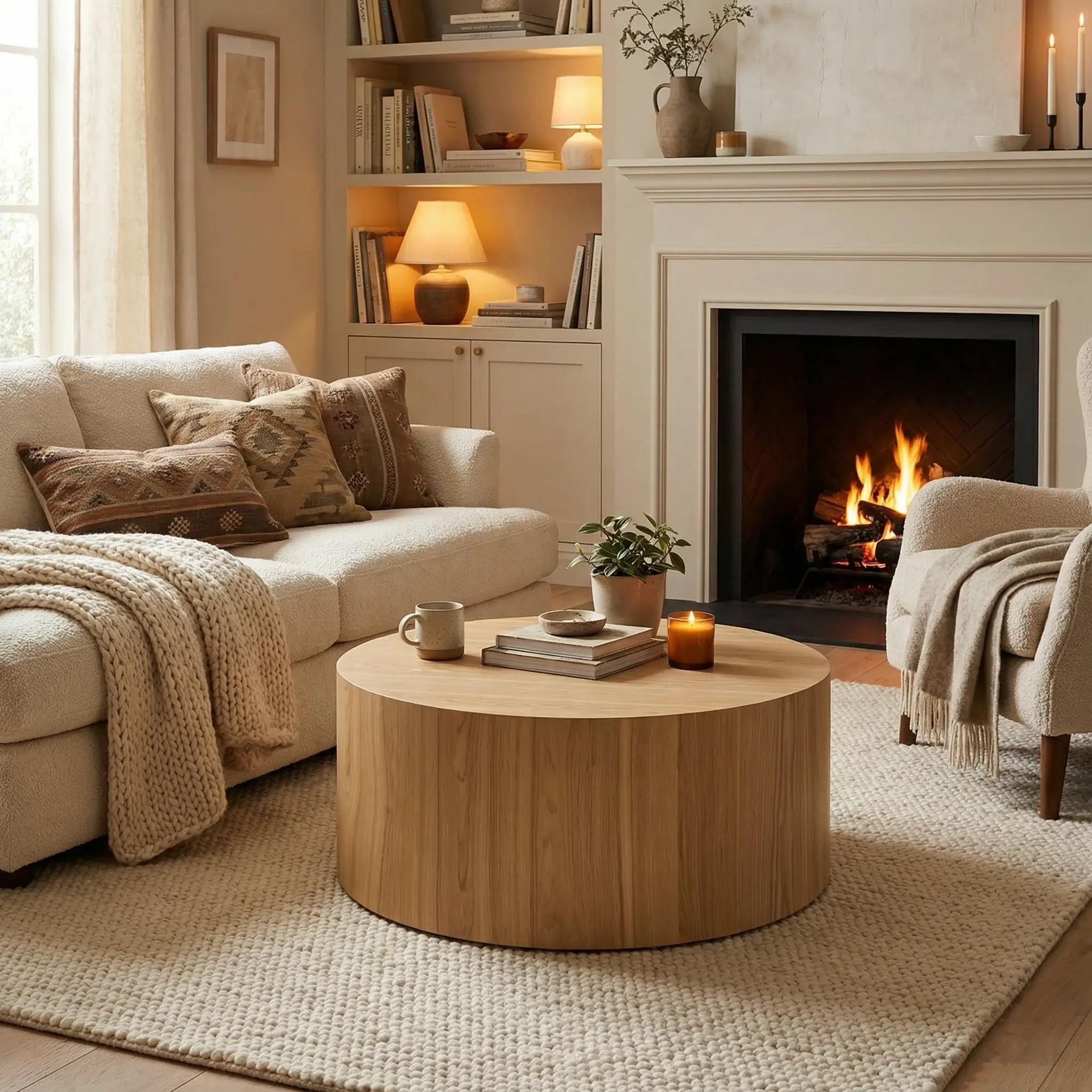
Example 2: Coffee Table
Imagine physically staging this table in a cozy living room setup, then breaking everything down to create a minimalist version. That's a full day's work minimum.
Or... you upload one photo and get both in under a minute.
Before: Basic product shot
After - Option 1: Table in cozy living room
After - Option 2: Table in modern minimalist space
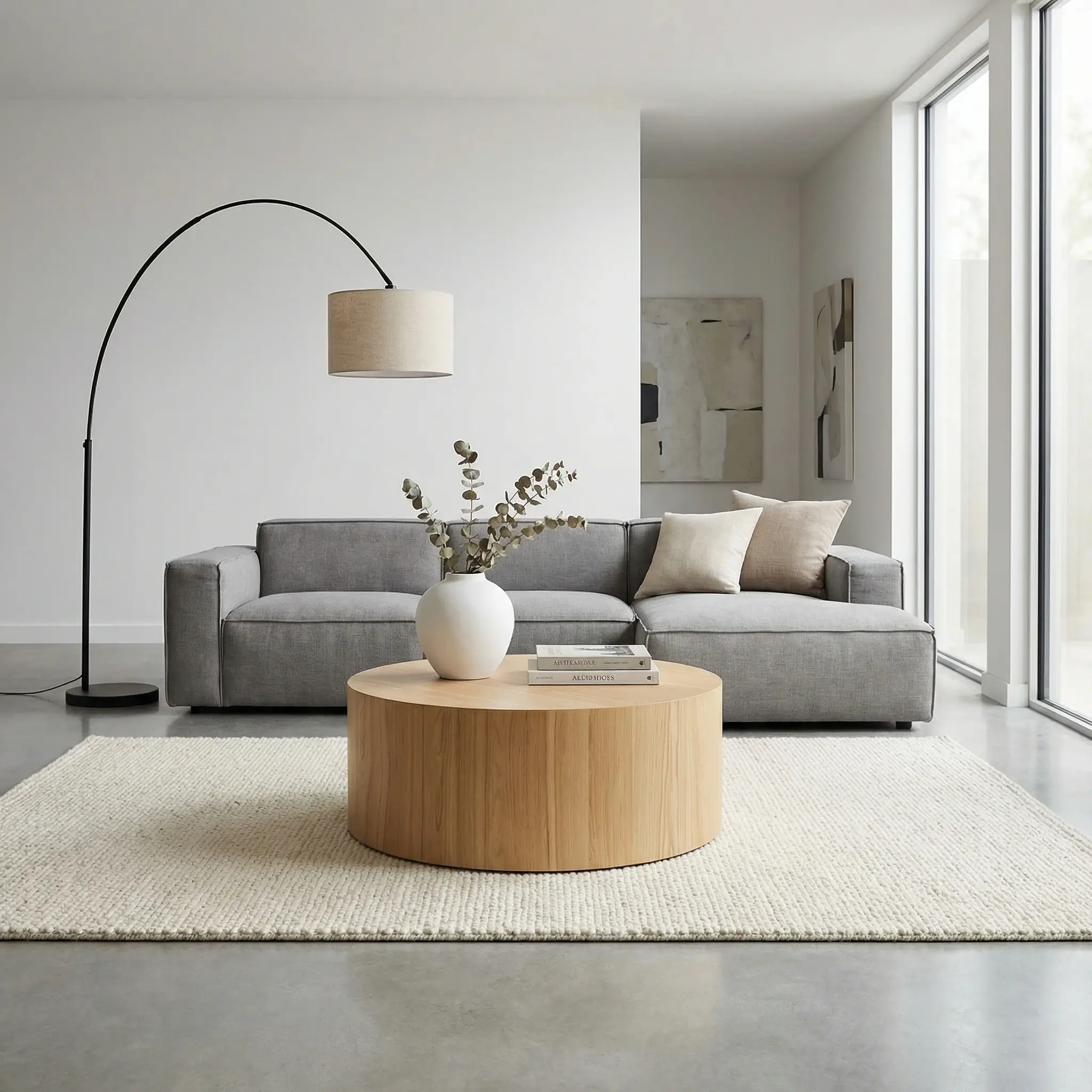
No furniture moving. No room staging. No exhausted photography team. Just professional results in seconds.
Essential AI Techniques for Furniture Photography
Now let's get into the actual prompts that make this work.
The beauty of AI furniture photography is that you control everything - lighting, room style, props, mood - without touching a single physical object. Change the "cozy living room" to "modern loft" with a few keystrokes, not a moving truck.
1. Mastering Virtual Lighting
Traditional photographers spend hours positioning lights, diffusers, and reflectors around large furniture pieces. With AI? You describe what you want:
Top Light Studio Prompt:
{
  "visual_style": {
    "lighting": {
      "type": "studio top light",
      "direction": "from above at 45-degree angle",
      "intensity": "bright but diffused",
      "shadows": "soft and gradual",
      "highlights": "subtle on wood grain and fabric textures"
    }
  }
}
Natural Window Light Prompt:
{
  "description": "Modern sofa in natural morning light",
  "visual_style": {
    "lighting": {
      "type": "natural window light",
      "direction": "side lighting from large windows",
      "color_temperature": "warm golden hour",
      "shadows": "soft and natural",
      "intensity": "bright and airy"
    }
  }
}
2. Creating Realistic Room Contexts
This is where AI really shines for furniture.
Traditional approach: Build or rent a fully decorated room set. Cost: $2,000-$5,000. Time: Days of setup.
AI approach: Describe the room you want. Cost: $0.04. Time: Seconds.
Here's how to prompt for different interiors:
Modern Living Room:
{
  "description": "Contemporary furniture in styled living space",
  "environment": {
    "location": "modern living room",
    "surfaces": ["light hardwood floors", "white walls"],
    "props": ["area rug", "indoor plants", "artwork on walls", "throw pillows"],
    "spatial_arrangement": "furniture naturally positioned with breathing room",
    "background": "soft bokeh of room details"
  }
}
Cozy Bedroom:
{
  "environment": {
    "location": "cozy bedroom",
    "surfaces": ["wooden nightstand", "soft carpet"],
    "props": ["bedside lamp", "books", "plants"],
    "atmosphere": "warm and inviting morning light"
  }
}
3. Managing Perspective and Scale
Traditional photographers use 70-200mm lenses and precise camera distances. AI handles this automatically:
Correct Perspective Prompt:
{
  "composition": {
    "camera_distance": "sufficient to avoid distortion",
    "focal_length": "70-200mm equivalent",
    "product_scale": "40-50% of frame",
    "product_placement": "centered with natural positioning",
    "perspective": "realistic and undistorted"
  },
  "constraints": {
    "maintain_realistic_proportions": true,
    "avoid_perspective_distortion": true,
    "preserve_product_details": true
  }
}
4. Multiple Angles and Views
Here's a scenario every furniture photographer knows:
"Can we get a 45-degree angle of that sectional sofa?"
Proceeds to spend 30 minutes repositioning a 180 kg piece of furniture
With AI, you describe the angle you want. No moving. No sweating. No calling your chiropractor:
Front View Prompt:
{
  "camera": {
    "angle": "straight-on eye level",
    "distance": "full product view",
    "focal_point": "center of furniture piece"
  }
}
45-Degree Angle Prompt:
{
  "camera": {
    "angle": "45-degree elevated",
    "distance": "medium shot showing depth",
    "focal_point": "showing three-dimensional form"
  }
}
Top Shot Prompt:
{
  "camera": {
    "angle": "overhead top-down",
    "distance": "showing full surface",
    "focal_point": "tabletop or seating surface"
  }
}
Complete JSON Prompts for Different Furniture Types
Copy these, paste them, and customize for your products. Each prompt below would traditionally require a completely different room setup - days of work compressed into seconds.
For Dining Tables:
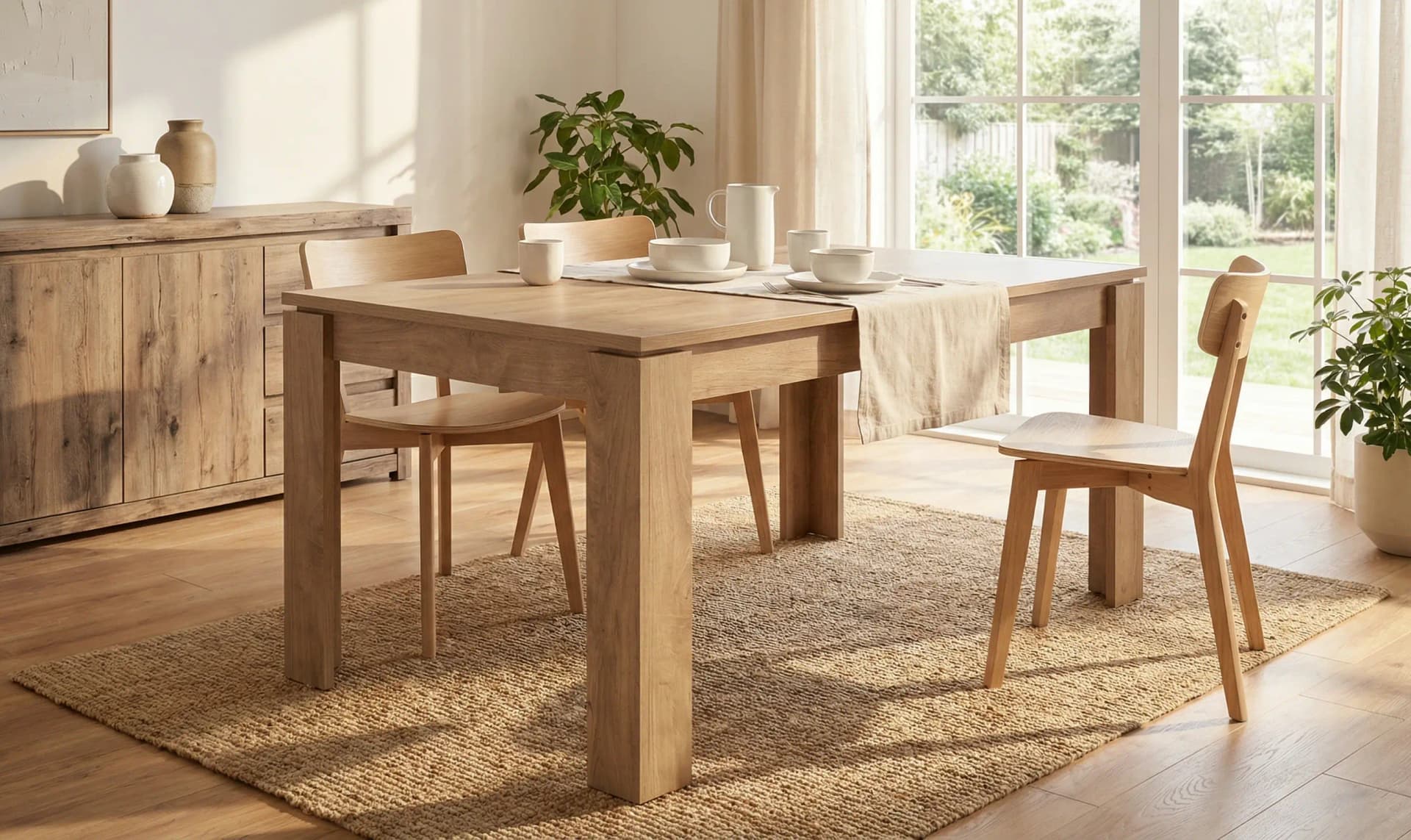
{
  "environment": {
    "location": "modern dining room",
    "surfaces": ["light hardwood floors", "white walls"],
    "props": ["dining chairs around table", "centerpiece", "artwork on wall"],
    "spatial_arrangement": "table as focal point with chairs positioned naturally",
    "background": "soft focus on room details"
  },
  "visual_style": {
    "aesthetic": "modern minimalist",
    "mood": "elegant and inviting",
    "lighting": {
      "type": "natural window light",
      "direction": "soft from side windows",
      "intensity": "bright and airy",
      "color_temperature": "warm daylight"
    },
    "camera": {
      "angle": "45-degree elevated",
      "distance": "sufficient to show full table without distortion",
      "depth_of_field": "medium - table sharp, background soft",
      "focal_length": "70-200mm equivalent"
    },
    "color_palette": ["warm woods", "whites", "soft neutrals"],
    "textures": ["wood grain", "fabric textures", "smooth surfaces"]
  },
  "composition": {
    "product_placement": "center foreground",
    "product_scale": "50% of frame",
    "negative_space": "generous room context",
    "balance": "symmetrical with natural asymmetry"
  },
  "constraints": {
    "preserve_product": true,
    "maintain_wood_grain": true,
    "realistic_scale": true,
    "humans_in_image": false,
    "avoid_perspective_distortion": true
  }
}
For Sofas and Couches:
{
  "environment": {
    "location": "cozy living room",
    "surfaces": ["area rug", "hardwood floors"],
    "props": ["throw pillows", "coffee table", "floor lamp", "indoor plants"],
    "spatial_arrangement": "sofa positioned naturally against wall",
    "background": "living room interior in soft focus"
  },
  "visual_style": {
    "aesthetic": "lifestyle home",
    "mood": "comfortable and inviting",
    "lighting": {
      "type": "warm ambient room lighting",
      "direction": "soft from multiple sources",
      "intensity": "cozy and warm",
      "color_temperature": "warm golden"
    },
    "camera": {
      "angle": "eye-level straight-on",
      "distance": "full sofa view",
      "depth_of_field": "shallow - sofa sharp, background soft"
    },
    "color_palette": ["warm neutrals", "soft grays", "natural textures"],
    "textures": ["fabric weave", "wood grain", "soft textiles"]
  },
  "composition": {
    "product_placement": "center with natural positioning",
    "product_scale": "60% of frame",
    "negative_space": "room for lifestyle context",
    "balance": "asymmetrical for natural feel"
  },
  "constraints": {
    "preserve_product": true,
    "maintain_fabric_texture": true,
    "realistic_cushion_shape": true,
    "humans_in_image": false
  }
}
For Chairs:
{
  "environment": {
    "location": "modern office or dining setting",
    "surfaces": ["hardwood floors", "neutral walls"],
    "props": ["matching chairs", "table or desk", "minimal decor"],
    "spatial_arrangement": "chair positioned naturally in context",
    "background": "soft focus on room setting"
  },
  "visual_style": {
    "aesthetic": "modern professional",
    "mood": "clean and sophisticated",
    "lighting": {
      "type": "bright natural light",
      "direction": "soft from side",
      "intensity": "bright and clean",
      "color_temperature": "neutral daylight"
    },
    "camera": {
      "angle": "45-degree elevated",
      "distance": "medium shot showing full chair",
      "depth_of_field": "medium",
      "focal_length": "85mm equivalent"
    },
    "color_palette": ["wood tones", "neutrals", "whites"],
    "textures": ["wood grain", "fabric or leather", "metal details"]
  },
  "composition": {
    "product_placement": "slightly off-center",
    "product_scale": "45% of frame",
    "negative_space": "generous for context",
    "balance": "asymmetrical"
  },
  "constraints": {
    "preserve_product": true,
    "maintain_joinery_details": true,
    "realistic_proportions": true,
    "humans_in_image": false
  }
}
For Coffee Tables:
{
  "environment": {
    "location": "modern living room",
    "surfaces": ["area rug", "hardwood floors"],
    "props": ["sofa in background", "decorative items on table", "plants", "books"],
    "spatial_arrangement": "table positioned naturally in front of seating",
    "background": "living room interior"
  },
  "visual_style": {
    "aesthetic": "lifestyle modern",
    "mood": "stylish and lived-in",
    "lighting": {
      "type": "warm room lighting",
      "direction": "soft ambient",
      "intensity": "cozy and inviting",
      "color_temperature": "warm"
    },
    "camera": {
      "angle": "slightly elevated looking down",
      "distance": "medium shot",
      "depth_of_field": "shallow - table sharp, background soft"
    },
    "color_palette": ["warm woods", "neutrals", "accent colors"],
    "textures": ["wood grain", "glass", "decorative objects"]
  },
  "composition": {
    "product_placement": "center foreground",
    "product_scale": "55% of frame",
    "negative_space": "room context visible",
    "balance": "natural asymmetry"
  },
  "constraints": {
    "preserve_product": true,
    "maintain_surface_details": true,
    "realistic_scale": true,
    "humans_in_image": false
  }
}
For Beds and Bedroom Furniture:
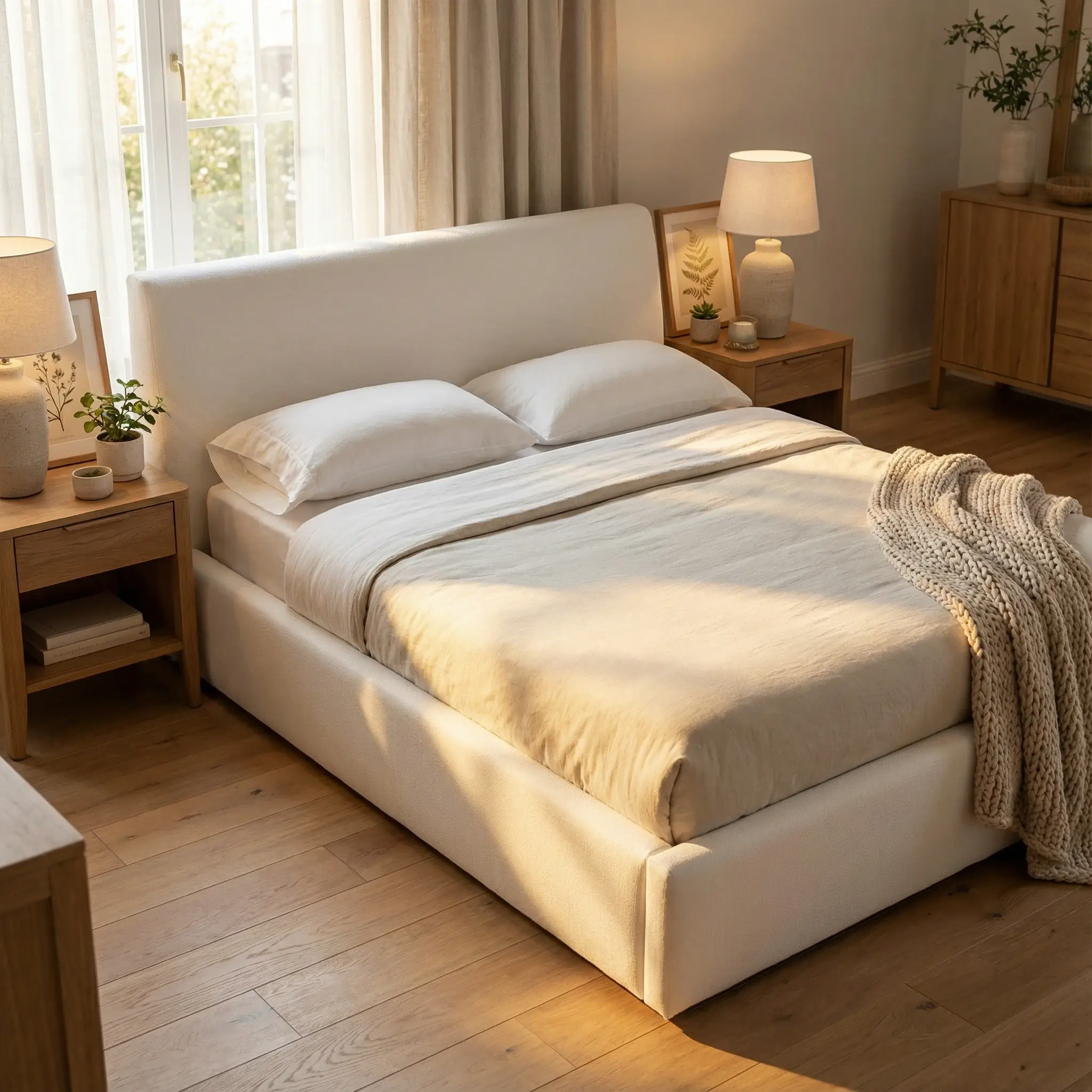
{
  "environment": {
    "location": "cozy bedroom",
    "surfaces": ["wooden floors", "bedside tables"],
    "props": ["bedding", "pillows", "bedside lamp", "plants", "artwork"],
    "spatial_arrangement": "bed positioned naturally in room",
    "background": "bedroom interior in soft focus"
  },
  "visual_style": {
    "aesthetic": "cozy bedroom",
    "mood": "relaxing and inviting",
    "lighting": {
      "type": "soft morning light",
      "direction": "from window",
      "intensity": "gentle and warm",
      "color_temperature": "warm golden"
    },
    "camera": {
      "angle": "45-degree elevated",
      "distance": "full bed view",
      "depth_of_field": "medium"
    },
    "color_palette": ["soft neutrals", "warm whites", "natural woods"],
    "textures": ["fabric", "wood grain", "soft textiles"]
  },
  "composition": {
    "product_placement": "center",
    "product_scale": "60% of frame",
    "negative_space": "room context",
    "balance": "symmetrical with natural elements"
  },
  "constraints": {
    "preserve_product": true,
    "maintain_wood_details": true,
    "realistic_bedding": true,
    "humans_in_image": false
  }
}
For Desks and Office Furniture:
{
  "environment": {
    "location": "modern home office",
    "surfaces": ["hardwood floors", "white walls"],
    "props": ["desk chair", "laptop", "desk lamp", "plants", "books"],
    "spatial_arrangement": "desk positioned naturally in office setting",
    "background": "office interior"
  },
  "visual_style": {
    "aesthetic": "modern professional",
    "mood": "productive and inspiring",
    "lighting": {
      "type": "bright natural light",
      "direction": "from window",
      "intensity": "bright and clean",
      "color_temperature": "neutral to cool"
    },
    "camera": {
      "angle": "slightly elevated",
      "distance": "full desk view",
      "depth_of_field": "medium"
    },
    "color_palette": ["wood tones", "whites", "grays"],
    "textures": ["wood grain", "metal", "fabric"]
  },
  "composition": {
    "product_placement": "center",
    "product_scale": "50% of frame",
    "negative_space": "office context",
    "balance": "asymmetrical"
  },
  "constraints": {
    "preserve_product": true,
    "maintain_surface_details": true,
    "realistic_scale": true,
    "humans_in_image": false
  }
}
Pro Tips for AI Furniture Photography
These tips will help you get the best results while keeping your workflow as fast as possible.
1. Start with Quality Base Images
The better your starting photo, the better your AI results. But "better" doesn't mean "expensive studio shot." It means:
- Shoot on pure white or neutral background (a white wall in your warehouse works)
- Clean your furniture (dust and fingerprints show up more than you'd think)
- Capture at highest resolution your phone or camera allows
- Step back - use sufficient camera distance to avoid distortion (70-200mm focal length recommended)
- Get a few angles if possible, but honestly? One good shot is usually enough
2. Layer Your Prompts
Begin simple, then add complexity:
- First: Basic room environment and lighting
- Second: Add props and decorative elements
- Third: Fine-tune mood and post-processing
3. Maintain Collection Consistency
Create a "brand template" prompt and modify only specific elements:
{
  "brand_style": {
    "consistent_elements": {
      "lighting": "always natural and warm",
      "color_grading": "slightly warm and inviting",
      "background_theme": "modern minimalist",
      "camera_angle": "45-degree elevated"
    },
    "variable_elements": {
      "room_type": "change based on furniture category",
      "props": "vary based on piece type",
      "exact_surface": "vary between hardwood, carpet, tile"
    }
  }
}
4. Test Different Room Styles (Without Moving Anything)
This is where AI really saves you. Testing different styles traditionally means completely rebuilding your room set. With AI? Just change the prompt.
Create variations for different customer preferences:
- Modern Minimalist: Clean lines, neutral colors, minimal props
- Cozy Traditional: Warm tones, soft textures, lived-in feel
- Scandinavian: Light woods, whites, natural elements
- Industrial: Exposed elements, raw materials, urban feel
Generate all four from the same base photo. See which converts best. Scale the winner. Zero furniture moving required.
5. Use Correct Camera Distances
Always specify sufficient camera distance in your prompts to avoid perspective distortion:
- Small furniture (chairs, side tables): 70-100mm equivalent
- Medium furniture (sofas, coffee tables): 85-135mm equivalent
- Large furniture (dining tables, beds): 100-200mm equivalent
Common Mistakes to Avoid
Even with AI doing the heavy lifting (pun intended), there are a few things that can trip you up:
1. Perspective Distortion in Your Base Photo
The mistake: Standing too close when photographing, causing the furniture to look warped The fix: Step back. Way back. Use zoom if needed. 70-200mm equivalent focal length prevents distortion. Pro tip: If your couch looks like it's bending in the middle, you're too close.
2. Wrong Scale in Room Context
The mistake: AI generates a room where your coffee table looks like it belongs in a doll house
The fix: Specify "product_scale": "40-60% of frame" in your prompts
Quick check: Does the furniture look like a normal human could use it? If not, adjust scale.
3. Over-Complicated Scenes
The mistake: "Add a plant, and a lamp, and books, and a dog, and a coffee cup, and..." The fix: Furniture is the star. Props are background actors. 3-5 props maximum. Remember: You're selling the sofa, not the throw pillow collection.
4. Inconsistent Lighting Across Collection
The mistake: Your dining table has moody evening lighting, your chairs have bright morning sun The fix: Create a brand lighting template and stick with it Why it matters: Inconsistency screams "amateur" faster than anything else
5. Ignoring Platform Requirements
The mistake: Using only lifestyle images for Google Shopping The fix: Generate both - white background for main product image, lifestyle for additional images Strategy: White background for marketplaces, lifestyle for social media and your website
6. Style Mismatch
The mistake: Putting your mid-century modern chair in a farmhouse kitchen The fix: Match the room aesthetic to your furniture's style and target customer Think: Where would someone who buys this actually put it?
Transform Your Furniture Business Today
Let's recap what AI furniture photography actually means for your business:
The old way:
- Rent massive studios ($500-$2,000/day)
- Hire movers to position heavy furniture
- Buy or rent staging props and decor
- Spend weeks on a single collection
- Pay thousands per product line
- Pray the weather cooperates for consistent lighting
The AI way:
- Take photos in your warehouse or garage
- Upload to BackdropBoost
- Generate unlimited room styles in seconds
- Spend $0.04 per image instead of $50+
- Launch new collections with same-day imagery
- Perfect consistency every single time
With the prompts in this guide, you can:
- ✅ Create Wayfair-quality lifestyle images from simple photos
- ✅ Test unlimited room variations without moving a single piece
- ✅ Show the same sofa in 10 different room styles
- ✅ Maintain perfect brand consistency across hundreds of products
- ✅ Scale your visual content production instantly
No more wrestling with 140 kg sofas. No more studio rental negotiations. No more week-long photoshoots.
Just professional furniture photography that sells.
Ready to Stop Wrestling With Furniture?
Take one photo of your furniture piece. Upload it. Generate magazine-quality room shots in seconds.
Your back will thank you.

About Alfred Simon
Co-Founder at BackdropBoost
Google Ads Expert • AI Entrepreneur
Hey there! I'm Alfred, a Google Ads expert turned AI entrepreneur. After years of managing Google Shopping campaigns and fighting for better performance, I built BackdropBoost to solve the image background problem that was driving me (and my clients) crazy.
With almost a decade of experience in Google Ads and managing hundreds of millions of dollars in ad spend, I know we need to take every opportunity to improve our campaigns. Back in the day we went down in the rabbit holes of SKAGs, adding bid adjustments to everything we could and creating waterfall Shopping campaigns.
Nowadays most of those things are automated. Now we have AI to play with and we need to use it to our advantage.
That is why I built BackdropBoost. With years of experience in Google Ads now I try to create tools that will help us, Google Ads experts, to find new opportunities to improve our campaigns.
Got questions about Google Shopping, AI image generation, or scaling e-commerce campaigns? I'd love to connect and chat!
Related Resources
Ready to Transform Your Product Images?
Get 5 free credits to test our AI-powered background generator
Start Free Trial